
Build A Golem Session Planner
Tick these lines in order so RELEASE Cash and THANKS actually move the mine.
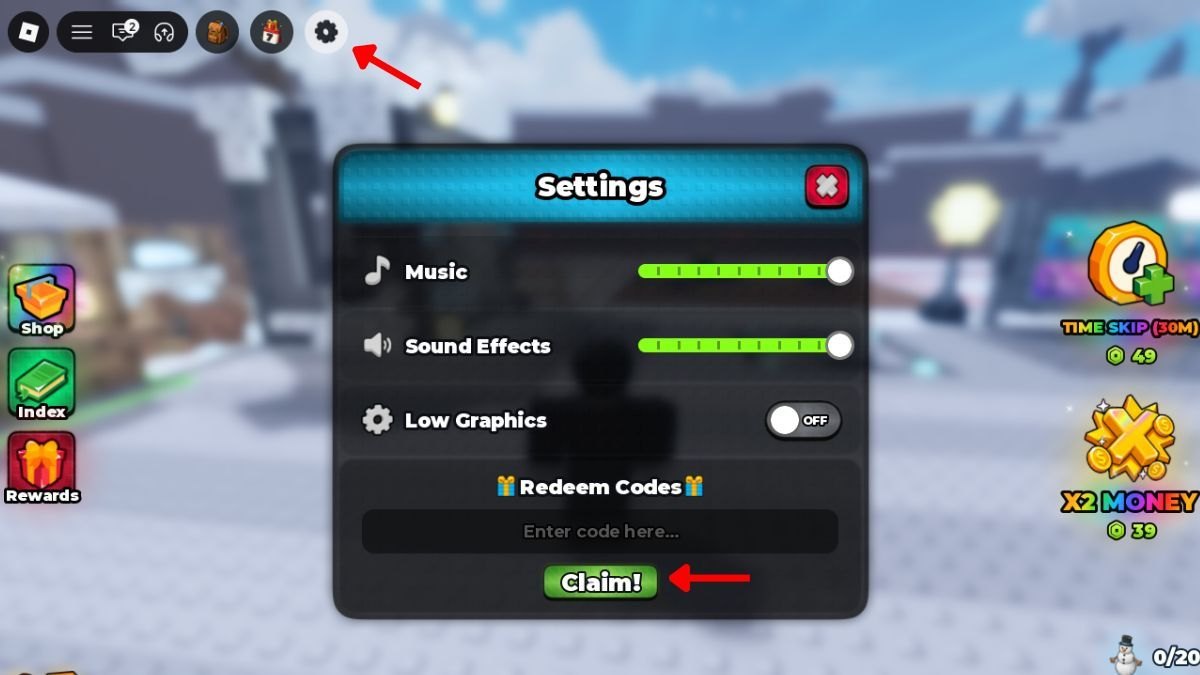
Use this page with Roblox open. It is a planner, not a story. If you want explanations, jump out to the linked guides and come back to the next number. The live codes this list expects are THANKS (15-minute Time Skip) and RELEASE (75,000 Cash) as of September 2026. Confirm the table on the codes hub if you are reading this later.
Build A Golem is the mining crafter from mesmerizing (really) on Roblox. Golems work offline. Servers hold six players. Your mine is personal. Do not import Army habits (spawners, islands, kingdom raids) into this list.
First session (about 15 minutes)
- Join Build A Golem on Roblox and finish the short tutorial. Do not skip Settings practice. The Codes box stays closed until the intro ends.
- Open the gear in the top bar (often near the center-right of the top icons). Settings should show Music, Sound Effects, Low Graphics, and Redeem Codes with a Claim button. If the gear is missing, the controls guide shows where Shop, Index, and Rewards sit so you are not hunting the wrong icon.
- Redeem RELEASE, then THANKS, using the click path in How to Redeem Codes. If Claim fails, change server once and retry. Do not spend Cash yet.
- Glance at Rewards and Index so you know they exist, then leave them. First-hour progress is crafter plus mine, not every button on the left rail.
- Buy or roll a complete cheap body. Typical slots are head, torso, arms, and legs. This wiki does not publish an official named catalog. Prefer a full worker over one flashy piece. Details live in How to Build Golems and the starter golem builds page.
- Assemble in the crafter. Confirm you have a golem, not a pile of unused parts.
- Send that golem into the mine. Assignment is the whole game. Follow How to Mine if the plot does not start printing Cash.
- Now use THANKS, and only if a timer or mining cycle is actually running. A skip on an empty plot is a wasted code.
- Spend a slice of RELEASE using the parts tier list — output first, cosmetics last. Keep a reserve for the next complete body rather than dumping the whole 75,000 on one roll.
- Log off with a golem still assigned. Offline work only happens if a worker was in the mine.
If any line stalls, the getting started guide explains the same hour in prose. The how to play page is the loop diagram behind this list.
Repeat session (5–10 minutes)
- Collect Cash waiting in the mine.
- Check the codes hub and updates for a new string. Redeem immediately if one appeared.
- Look at the current golem. If a slot is obviously filler, replace that slot only. Use golem build tiers instead of dismantling a miner that is already printing.
- Confirm assignment. Idle plots do not grow while you AFK in Shop.
- Optional: fire a Time Skip item if you have one stacked (the HUD can show skip charges separately from the THANKS code).
- Leave. Do not recraft from zero unless the miner is clearly dead.
Spend filter for RELEASE Cash
Ask three questions before every roll or purchase:
- Does this complete a body that can enter the mine tonight?
- Is this better than the weakest slot I already field?
- Would I still want this part if the next roll is junk?
If the answer is no, keep the Cash. The parts tier list is the ranking behind those questions. Late accounts should switch the filter to late game strategy but keep the same three checks.
Time Skip filter for THANKS
Skip when:
- A golem is assigned and a wait is visible.
- A craft you already queued is the bottleneck.
- You are about to log off and want the next offline window to start sooner.
Do not skip when:
- You have no golem.
- You are still in the tutorial.
- You just want the animation to look faster.
HUD reminders
- Settings / gear — codes, audio, low graphics.
- Shop — spend sink. Open it after you know what slot you are filling.
- Index — collection. Useful later, not during the first craft.
- Rewards — extra claims. Check once per session, not between every roll.
- Time Skip / money multiplier items — inventory boosts. They are not the same as promo codes, but they follow the same rule: use them on a working mine.
When to stop planning and just play
If you already have a miner assigned, Cash collecting, and both launch codes claimed, you do not need this list every login. Bookmark the codes hub and the updates hub, and only return here after a patch moves the menu. The planner exists for the messy first hour and for the player who keeps opening Shop first.
Keep Discord and the Roblox group mesmerizing (really) in the links hub for extra rewards. There is no official Trello. This checklist will not claim codes for you; it only stops you from claiming them in the wrong order.
Frequently Asked Questions
Quick answers for codes, mining, and crafter questions.
Can I skip the tutorial line?
No. The Redeem Codes box in Settings stays closed until the intro finishes. See How to Redeem Codes.
Should THANKS be used before the first golem?
No. Assign a worker with How to Mine first, then skip a real timer.
What if RELEASE Cash is already spent?
Ignore the spend-filter block. Collect, assign, and follow starter golem builds with whatever parts you kept.
Is this for Build a Golem Army?
No. This planner is only for the mining crafter. Army spawners and island rebirths are a different game.
Where do I check for new codes between sessions?
The codes hub and the updates hub. Discord is listed on the links hub.