
Build A Golem Roblox How Mining and Timeskips Work
Assign workers, collect Cash, time THANKS, and expand a personal mine that runs offline.
Mining is how Build A Golem! turns a crafted body into Cash. The mine is personal even though the Roblox server holds up to six players. Nobody else operates your plots. Golems work while you are online and they keep working while you are offline. If Cash is not moving, the usual cause is an unassigned golem, not a missing multiplayer partner and not a hidden army spawner from a different game.
This page assumes you can already assemble a body. If you cannot, use How to Build Golems and the first-hour order in Getting Started. The full loop sits in How to Play. HUD locations are Controls.
Assign every finished golem
After the crafter, walk the golem to your mine and assign it to an open working slot or plot. Watch the Cash value change at least once. If it does not, cancel and reassign. Lobby idle is not mining. Fill current slots before you buy empty land. An expanded mine with no miners is a bigger zero.
You may see other players near their own setups. That is normal online presence. They cannot collect from your plots. Do not wait for a group to “start the mine.” There is no raid ready-check.
If the assignment prompt will not appear, step closer and face the slot. Mobile cameras often need a small rotate; Controls covers that. Then watch a tick. No tick means no worker, even if the golem is standing in the dirt.
Collect Cash on purpose
Cash is the in-game spendable output, not Robux. Collect when you have a target: a roll, a missing slot piece, or an expansion. Hovering for every tick is optional. The loop in How to Play wants you walking between crafter, shop, and mine, not standing still.
Spend order after a collect stays the same after hour one: complete a missing golem, staff empty plots, then expand, then cosmetics. That matches Getting Started. If two bodies compete for one plot, assign the stronger mining stats and park the rest. The tier list and players hub help when the cards are close.
Offline progress is set up, not automatic magic
The official pitch is that golems work offline. Treat that as a feature you must set up. Before you log off, confirm assignments. A timeskip is not required for offline to function. Offline is why a short session still matters: you plant workers, leave, and come back to a wallet.
If you return to no Cash, re-check assignment and whether you actually crafted a miner. Then check updates only if a patch day just landed. The last notable update on this wiki is September 1, 2026. Offline does not make the experience private; you can still load into a populated six-player server when you return.
Timeskips with THANKS
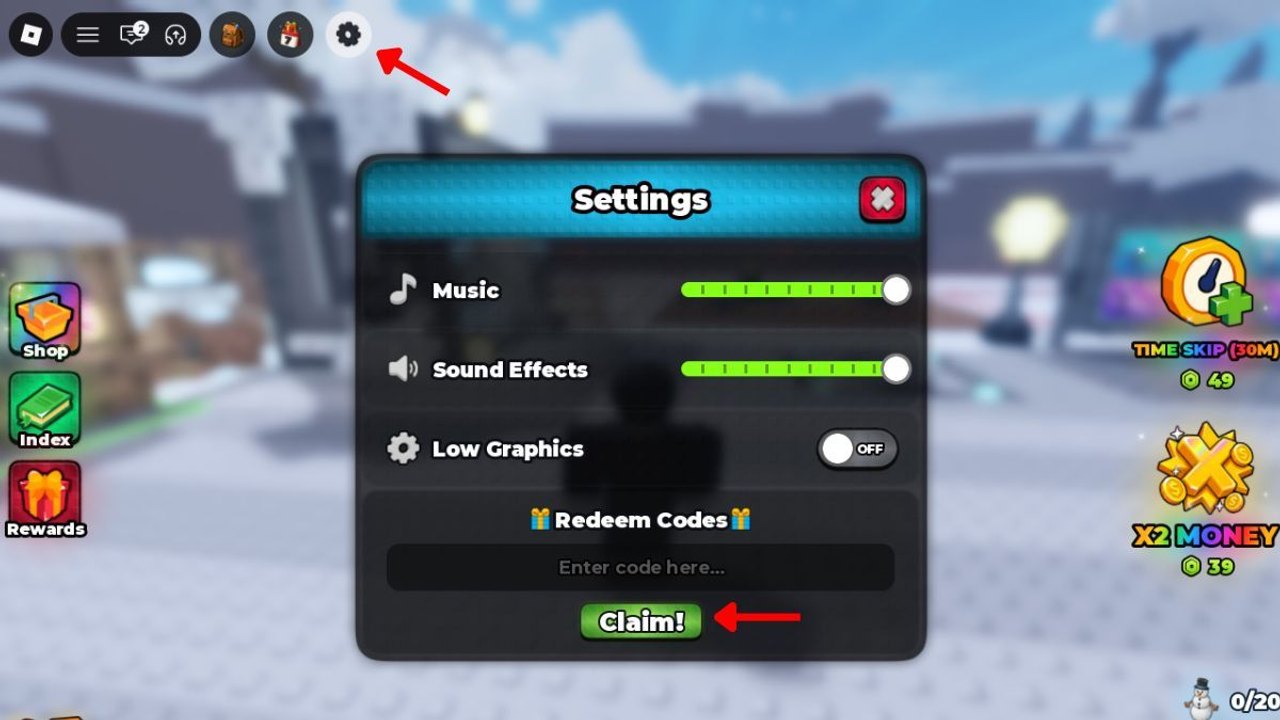
THANKS currently grants a 15-minute timeskip. Redeem it from the Settings gear at the top-left, the same place as RELEASE. Full redemption notes are on the codes page. Old servers sometimes reject new strings, so join a fresh instance if Claim fails.
Rules for THANKS:
- Redeem it so the reward sits on the account.
- Do not trigger the skip until at least one golem is assigned and ticking.
- Prefer skipping when plots are full, so the 15 minutes apply to as many workers as you own.
- Do not treat THANKS as a substitute for offline. Offline still works without a skip if assignments are in place.
RELEASE is 75,000 Cash, not a skip. Convert it into parts and space. Using both codes in the same session is strong if the mine is already staffed: Cash for the next body, skip for the current staff. Time that pairing with the session planner so you do not skip first and craft second.
Expanding the mine
Expand when two things are true: every slot you already paid for has a miner, and you have parts or Cash to staff the new space quickly. Expanding first to “prepare” usually means you stare at empty plots.
If workers are idle because you ran out of plots, expand. If plots are empty because you ran out of golems, go back to rolling and the crafter. That branch is the whole midgame. Nothing here unlocks spawners or PvP kingdoms; you are still rolling parts and assigning miners.
THANKS timing is the last habit to lock in. Never skip into an empty plot. Expand only when miners would otherwise stand idle. If you log off, the last thing you confirm should be an assignment, not a shop color preview. A personal mine with one ticking worker beats a wide empty floor with an unused timeskip sitting in Settings.
Frequently Asked Questions
Quick answers for codes, mining, and crafter questions.
Do golems mine while I am offline?
Yes, if they are assigned before you leave. Offline progress does not require THANKS. Come back, collect Cash, and keep staffing plots.
When should I use the THANKS timeskip?
After at least one golem is assigned and, ideally, after every owned plot is staffed. Redeem it early from codes, but trigger the skip late.
Why is my mine not making Cash?
The golem is probably unassigned, the craft never finished, or you expanded into empty slots. Reassign, then watch one tick before you spend more Cash.
Can other players mine my plots on the six-player server?
No. Online presence is real, but mines are personal. Visitors cannot assign your workers or collect your Cash.
Should I expand before I have enough golems?
No. Staff what you own, then expand. Use the session planner if you keep buying space you cannot fill.