
Build A Golem HUD Checklist
Which left-rail button to open, in order, so you stop bouncing between Shop and Settings.
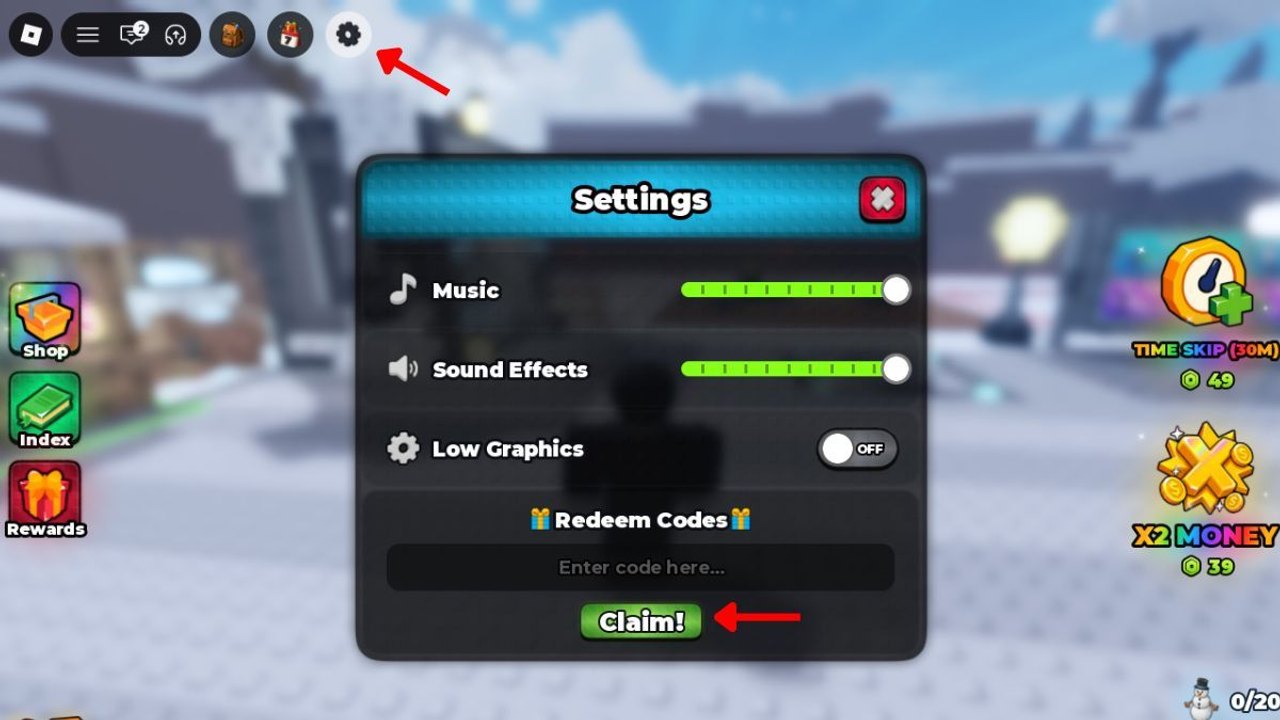
The Build A Golem HUD is small and easy to mix up. Settings hides Redeem Codes. The left rail shows Shop, Index, and Rewards. Time Skip charges and money multipliers can sit on the right. Players lose first-hour Cash by opening Shop before Settings, or by treating Index as the code box. This page is a button checklist, not a second copy of How to Play. Keep it beside Roblox.
The game is a mining crafter from mesmerizing (really) on six-player servers with personal mines. Golems work offline once assigned. Promo codes as of September 2026 are THANKS (15-minute Time Skip) and RELEASE (75,000 Cash). Full tables: codes hub. Click path: How to Redeem Codes.
This is not an Army HUD. No spawner button, no island rebirth, no kingdom raid. If your screen shows those, you launched the wrong experience.
Open in this order (first session)
- Tutorial prompts until they finish. The Codes box stays closed until then.
- Settings / gear in the top bar. Music, sound, low graphics, and Redeem Codes with a Claim button. Paste THANKS, Claim, paste RELEASE, Claim. If Claim fails, change server once. Details: How to Redeem Codes.
- Rewards once. Take whatever is waiting. Then close it. Rewards is not the roll booth.
- Index once. See what parts you already own so you do not buy a duplicate. Then close it.
- Shop only after you know the empty slot. Spend a slice of RELEASE toward a complete body, not a highlight reel. Rolling rules: How to Roll Parts.
- Crafter as soon as the set is complete. How to Build Golems.
- Mine assignment. Watch Cash tick. How to Mine and offline mining.
- Time Skip item or THANKS only if a timer or miner is actually running.
- Log off with a worker assigned.
The session planner is the same hour as a numbered session. This page is which pane to touch so the planner is not guessing at icons.
Button dictionary
Settings / gear. Codes, audio, low graphics. Not the Roblox Esc menu. Controls if the two menus overlap on a phone.
Shop. Spend sink. Cash and possibly Robux convenience. Open with a shopping list: missing torso, not “whatever is glowing.”
Index. Collection of discovered parts or golems. Claim-if-present, then leave. It will not redeem THANKS.
Rewards. Extra claim lane. Daily or milestone gifts if the pane has any. Separate from promo strings in Settings.
Time Skip stack. Inventory skips, sometimes shown as 30-minute charges in community screenshots. Same rule as THANKS: use on running work.
Money multiplier stack. Temporary Cash boost. Use it when a golem is already mining, including right before you go offline, not while you are still rolling.
Crafter and mine. World stations, not rail buttons. Walk to them. Camera notes are on Controls.
Repeat-login HUD (five minutes)
Collect mine Cash. Open Settings only if you expect a new code from Discord. Open Rewards once. Open Index only if you rolled since last time. Shop only to replace the weakest slot using the parts tier list. Confirm assignment. Optional skip. Leave.
Do not recraft from zero. Late game strategy is one-slot swaps. Starter golem builds is still the rule if you somehow have no miner.
Mistakes this checklist exists to stop
Opening Shop first. Codes first. Always.
Redeeming in Discord chat. Discord is how you hear a string. Settings is how you claim it. Links hub has the invite.
Using a Time Skip at the roll booth. Skips do not buy better luck. They fast-forward work.
Leaving with the crafter camera open and nobody in the mine. Offline earn on the store icon still needs assignment.
Pair this tool with
- Session planner for the hour.
- Getting Started if this is day one.
- Updates if a patch moved a button.
- Scripts hub if someone offered an auto-clicker for these panes — decline.
Print nothing. Tick the rail in order. Then go to the mine.
Frequently Asked Questions
Quick answers for codes, mining, and crafter questions.
Where is the code box on the HUD?
Settings / gear, then Redeem Codes at the bottom. Full clicks are in How to Redeem Codes.
Should I open Shop or Index first?
Neither. Settings and codes first. Index is a collection check after you own parts. Shop is the spend sink last.
Are Rewards the same as THANKS and RELEASE?
No. Promo codes are in Settings. Rewards is a separate claim pane. Live strings stay on the codes hub.
When do I press a Time Skip on this checklist?
After a golem is assigned or a timer is visible. See offline mining.
What if I cannot find the gear on mobile?
Use the controls guide. The gear is in the experience HUD, not the Roblox system menu.