
Working Build A Golem Codes
THANKS and RELEASE for September 2026, plus how to spend Cash versus Time Skips.
Build A Golem codes are short, case-sensitive strings that drop free Cash or a Time Skip into the same mining loop you already play: roll or buy parts, assemble a golem in the crafter, send it into your personal mine, and expand that mine as earnings stack. The title is live on Roblox from the group mesmerizing (really) — created 26 June 2026, last touched around 1 September 2026 — and these rewards exist to shorten the first hours, not to replace rolling, crafting, or assigning workers.
As of September 2026 this hub lists two working codes. Neither has an announced expiry date, but Roblox promo strings can vanish without a patch note, so redeem them on the first session you finish the tutorial. Step-by-step UI help lives on How to Redeem Codes. If you have not spawned a worker yet, read Getting Started and How to Play before you dump Cash into random parts.
This page is only for Build A Golem! the incremental mining simulator (about 720,000 visits, 6,400 favorites, six players per server, personal mines). It is not Build a Golem Army. Army listings talk about spawners, PvP kingdoms, islands, and rebirth. Those systems are not part of this crafter-and-mine loop, and codes copied from that other title will not claim here.
Active codes (September 2026)
Type each string exactly as shown. Rewards credit to the account that clicks Claim, not to the shared server.
| Code | Reward | Notes |
|---|---|---|
| THANKS | 15-minute Time Skip | Case-sensitive. Best used after a golem is assembled and assigned, so the skip covers real mine or craft wait time. |
| RELEASE | 75,000 Cash | Case-sensitive. Bank it for parts you actually want, not the first roll on the board. |
Both codes were circulating with the early-September milestone coverage. We have not seen a third public string yet. When Discord or a patch adds one, it will land in this table first, then in the Updates Hub.
How to redeem (short version)
- Join Build A Golem on Roblox and finish the short tutorial. The Codes box stays locked until that sequence ends.
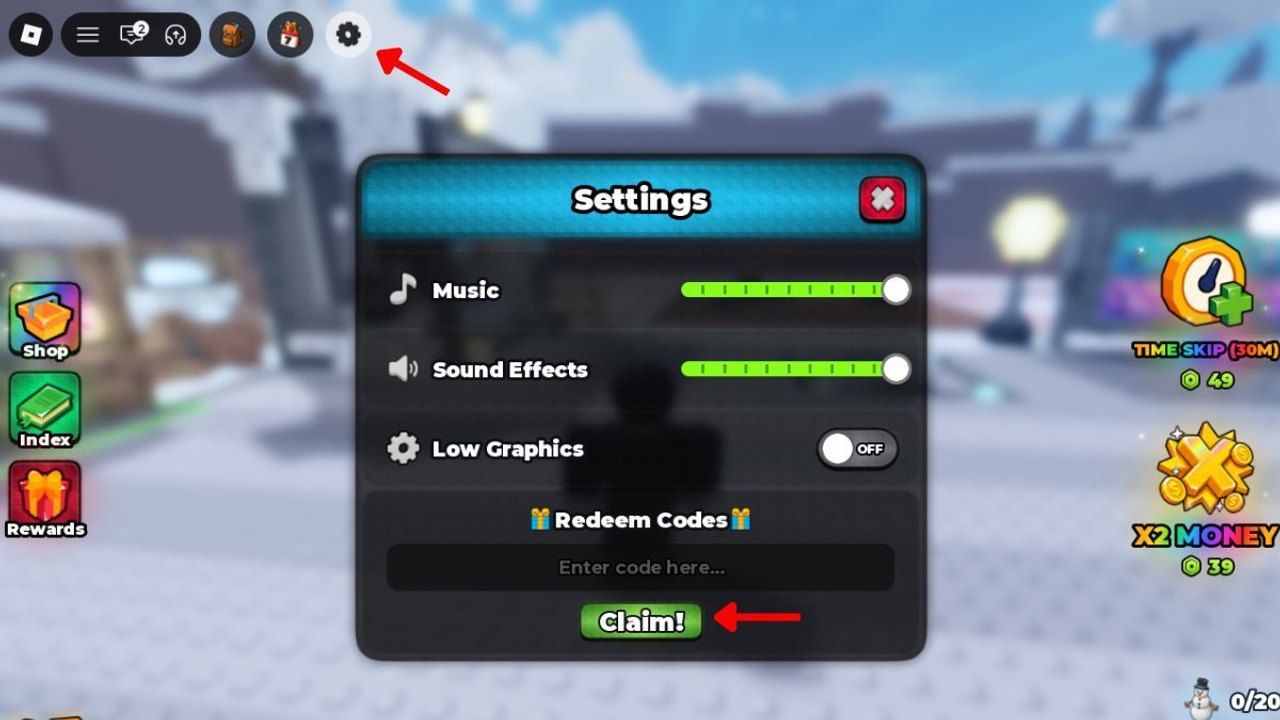
- Open the gear / Settings control in the top-left of the HUD.
- Scroll to the Codes section at the bottom of that menu.
- Type THANKS or RELEASE exactly — capitals matter.
- Press Claim. Cash lands in your wallet; the Time Skip lands as a usable skip item.
- If Claim does nothing, hop to a new server and try once more. Stale sessions often ignore a code that a fresh instance accepts.
The full click path, screenshots of typical failure states, and a checklist for mobile versus desktop live in How to Redeem Codes. Use that guide if Settings is missing, the box rejects input, or you cannot find the gear after the tutorial.
Cash versus Time Skip — what each reward is for
RELEASE (75,000 Cash) is a buy-power spike. Cash is the currency your mine prints while golems work, including while you are offline. You spend it to roll or purchase parts, then to grow the mine so more workers can run. Seventy-five thousand is a large early lump; it is not an excuse to click every roll. Park the cash, open the tier list, and only then buy into slots you mean to keep — typical assembly slots are head, torso, arms, and legs, without any official named roster on this wiki. After a golem is built, How to Mine covers assignment and collection so the lump sum starts printing more Cash instead of sitting in the wallet.
THANKS (15-minute Time Skip) is a wait-power spike. Incremental sessions stall on craft timers, mine cycles, and expansion delays. A skip does not buy a better part by itself; it fast-forwards time that would have been spent staring at a progress bar. Use it when a worker is already in the mine or a craft is already queued. Burning THANKS in an empty plot wastes the only skip we currently list.
A practical order for a first hour: redeem both codes, spend a slice of RELEASE on a complete set of parts, assemble in the crafter, assign the golem, then fire THANKS so the first mining window is not idle. The session planner is built around that sequence so you do not skip before you have something to skip.
Shared servers cap at six players. You will see other miners in the instance, but Cash, parts, golems, and the mine itself stay on your account. Codes never credit the whole lobby. Do not wait for a friend to “host” a skip — hop in, claim, and work your own plot.
Expired codes
No expired Build A Golem codes are listed yet. When THANKS or RELEASE dies, it will move here with the date we confirmed the failure, and the active table will shrink. Until that happens, treat both strings as live and redeem them rather than saving a screenshot “for later.”
| Code | Last known reward | Status |
|---|---|---|
| — | — | None recorded as of September 2026. |
If a string from a random video fails, it is probably for another game, mistyped, or already claimed on that account. We do not keep a rumor column.
Why a code fails
Most “broken code” reports are one of six things:
- Tutorial still running. The Codes section does not accept input until the intro finishes. Leave the dialogue, then open Settings.
- Wrong case or extra space. THANKS and RELEASE are all caps with no spaces.
thanks,Thanks, orRELEASEwith a trailing space will bounce. - Already claimed. Each code is once per account. A second Claim on the same string is a silent no.
- Old server. New codes often fail on instances that have been up for hours. Rejoin and retry.
- Wrong game. Scripts, Trello boards, and Army wikis recycle the word “golem.” If the reward text mentions kingdoms or spawners, you are in the other title.
- Expired or mistyped rumor. We only list strings we can describe with a reward. Paste from this table, not from memory.
Still stuck? Walk the longer redemption troubleshooting list, then check Updates in case a patch moved the menu.
Where to spend the rewards next
Codes are a head start, not a build. After Claim:
- Follow Getting Started if this is your first mine.
- Use How to Play for the roll → crafter → mine loop in order.
- Assign and collect with How to Mine so offline progress is actually running when you log off.
- Rank parts on the tier list before you empty RELEASE.
- Plan THANKS around real timers with the session planner.
- Watch the Updates Hub for the next drop.
- Keep the links hub for Discord and the Roblox group — there is no official Trello.
Join the official Discord and the Roblox group mesmerizing (really) for extra in-game rewards and the usual “new code” pings. This wiki is unofficial; we mirror public strings, we do not invent them.
Spend THANKS on a mine that is already working, and spend RELEASE on parts you are willing to craft. That pairing is the whole point of this list: two codes, two different bottlenecks, one personal mine that keeps digging after you close Roblox.
Frequently Asked Questions
Quick answers for codes, mining, and crafter questions.
What are the working Build A Golem codes right now?
As of September 2026 the live strings are THANKS (15-minute Time Skip) and RELEASE (75,000 Cash). Redeem both from Settings after the tutorial. See the table on this Codes Hub and the click path on How to Redeem Codes.
Should I redeem THANKS or RELEASE first?
Claim both immediately so neither expires on you, then spend RELEASE on a full set of parts and fire THANKS after a golem is in the mine. A Time Skip with an empty plot wastes the reward. The session planner lays out that order.
Do codes work while I am offline?
You must be in a server and press Claim yourself. After that, Cash from RELEASE sits in your wallet, and golems you already assigned keep mining offline. THANKS is a skip you trigger in-session; it does not run from the login screen.
Why does Claim fail even when I type THANKS correctly?
Finish the tutorial, drop any extra spaces, and join a new server. Codes are case-sensitive and once per account. If you pasted a string from a different golem game, it will never work here.
Is there an official Trello for new codes?
No. Watch the [official Discord](https://discord.com/invite/WD2rQmh3q3), join the group mesmerizing (really), and refresh this hub plus the Updates Hub. We do not maintain a fake Trello link.