
How to Redeem Build A Golem Codes
Finish the tutorial, open the top-left gear, scroll to Codes, type the string, then Claim.
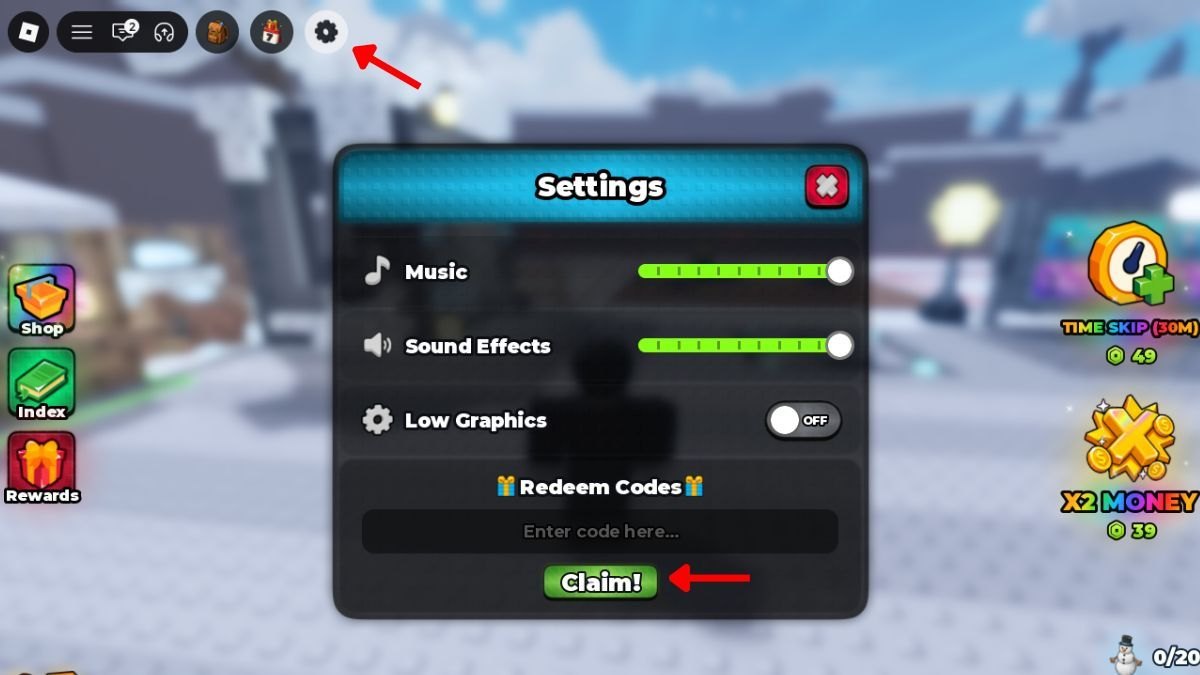
Redeeming a Build A Golem code is a five-click job once the tutorial is done, but most failed claims happen before you ever type THANKS or RELEASE. The Codes box is buried in Settings, it is case-sensitive, and servers that have been sitting open since morning often ignore a string that a fresh instance accepts. This page is the click-by-click path for the mining title from mesmerizing (really) — not a different golem army game — plus the exact recovery steps when Claim does nothing.
Live rewards sit on the Codes Hub. As of September 2026 that list is THANKS (15-minute Time Skip) and RELEASE (75,000 Cash). Read this guide to get them onto the account; spend them with Getting Started and the session planner after the menu closes.
You play on a shared Roblox server with up to five other people (six players total). Each mine is still personal. Codes credit your Cash and skip inventory, never the lobby. You do not need a friend in the instance, and you do not need split-screen. If someone in chat says the code is “for the host,” they are describing a different genre.
Before you open Settings
- Launch Build A Golem on Roblox on the device you actually play — PC, mobile, or console through the Roblox app.
- Stay in the session long enough to finish the short tutorial. Dialogue, a first walk to the crafter or mine, and the intro prompts all count. Closing the HUD early leaves Codes locked.
- Confirm you can move, open the default UI, and see the top-left cluster of buttons. If the gear is missing, the tutorial is probably still capturing input. Complete the last prompt rather than mashing Esc.
- Have the string ready from the Codes Hub. Do not retype from memory. THANKS and RELEASE are all caps with no spaces.
If this is your first ever session, it is worth finishing the tutorial, claiming both codes, then immediately walking the Getting Started loop so RELEASE does not sit unspent while you wander. The controls guide maps the same top-left cluster if you cannot tell the gear from shop or inventory icons on a small screen.
Step-by-step redemption
- Look at the top-left of the screen. Click or tap the gear (Settings). On a phone, the hit box is small; rotate to landscape if the icon sits under a notch or chat bubble.
- Scroll to the bottom of the Settings menu. Codes are not on the first panel. Players who stop at music, graphics, or extra-reward toggles never see the text box.
- Find the Codes section. You should see a field and a Claim control. If the field is greyed out, you are still in the tutorial or a UI modal is open — close other windows and try again.
- Type or paste THANKS or RELEASE exactly. No quotes, no extra space at the end, no lowercase.
- Press Claim. Success is usually a short confirmation plus a Cash or skip change. There is not always a loud fanfare.
- Close Settings. Check the wallet for the 75,000 Cash from RELEASE, and check skip / shop inventory for the 15-minute THANKS item. If the numbers did not move, the claim failed even if the button animated.
- Repeat for the second code. Each string is separate. Claiming THANKS does not auto-grant RELEASE.
That is the entire official path. There is no NPC, no Discord bot, and no website form that can credit this game. Anyone asking you to paste a code into a third-party site is not helping you redeem.
After Claim — do not idle in the menu
A redeemed code only matters when the reward hits the loop. RELEASE is buy power: leave Settings, look at your Cash, and decide which parts to roll or purchase before you expand the mine. THANKS is wait power: it should cover a craft or a mining window that is already running, not an empty plot. If you have not assembled a worker yet, craft first, assign the golem, then fire the skip.
Use the session planner so the 15 minutes line up with real timers. Golems already in your personal mine keep working offline; the skip itself is an in-session action. Logging out with an unused THANKS in inventory is legal, but it is a wasted first-hour advantage.
Troubleshooting when Claim fails
Work this list in order. Do not skip to “the code is dead” until you have tried a new server.
The box will not take text. Finish the tutorial. Close any shop, craft, or dialogue window. On mobile, tap the field once and wait for the keyboard. If Settings itself will not open, check the controls guide for the gear location — it is top-left, not the Roblox escape menu.
The button presses and nothing happens. You likely have a trailing space, the wrong case (thanks instead of THANKS), or a look-alike character from a styled font. Delete the field and paste from the Codes Hub table. Then leave the server and join a new one. Old instances are the number one reason a correct string fails on the same day a new player claims it instantly.
It says you already claimed it. That is final for this account. Alts are against Roblox rules we will not coach. Ask a friend on their own account, or wait for the next public drop on the Updates Hub.
You are sure the spelling is right and the server is new. Confirm you are in Build A Golem! by mesmerizing (really), the incremental miner, not Build a Golem Army. Army codes, spawners, kingdom rewards, and rebirth gifts do not exist in this crafter. Also confirm the string is still in our active table — as of September 2026 no expired list exists, but that will change the first time THANKS or RELEASE is retired.
Cash went up but you cannot find the Time Skip. THANKS is not extra Cash. Look for a skip item or a Time Skip control after you close Settings. If you claimed RELEASE twice in your head but only typed it once, the second reward was never requested.
You play on a full server. Six-player caps mean you might wait in a queue, but they do not block codes. After you load in, Settings still works. You do not need an empty server, only a fresh one if the previous instance was stale.
Device notes
On PC, the gear is a mouse click; make sure you are not clicking the Roblox hamburger or the experience’s shop. On mobile, scroll the Settings sheet with a drag, not a flick that closes the menu. On console, use the Roblox-mapped cursor or the on-screen pointer to hit the same top-left gear — the Roblox system menu is a different button and will not contain THANKS.
If the HUD scale is tiny, lower other popups first. Chat, trade prompts from other players on the shared server, and tutorial arrows all steal taps. Pause social UI, then open Settings again.
Where new strings appear
Bookmark this wiki’s Codes Hub and the Updates Hub. Developers post milestone gifts in the official Discord. Joining the Roblox group mesmerizing (really) can add extra in-game rewards that are not typed codes. There is no official Trello. When a new string ships, redeem it with the same gear path; the menu does not change just because the reward did.
Once Claim lights up, leave Settings, confirm Cash and the skip item, then walk to the crafter instead of idling on the HUD. A code that sits unspent in a menu is the same as a code you never typed.
Frequently Asked Questions
Quick answers for codes, mining, and crafter questions.
Where is the Codes box in Build A Golem?
Open the gear / Settings icon at the top-left, then scroll to the bottom of that menu. The box is not in the Roblox escape menu and not in the shop. Full clicks are in this How to Redeem Codes guide.
Do I have to finish the tutorial before redeeming?
Yes. The Codes section stays locked until the short tutorial ends. Finish the prompts, then open Settings. If you are lost after that, use Getting Started.
What should I do if a working code still fails?
Delete extra spaces, match the capitals, and join a brand-new server. Then paste THANKS or RELEASE from the Codes Hub. Stale servers are the usual culprit, not a hidden extra step.
Can a friend redeem THANKS for my account?
No. Codes credit the account that presses Claim in Settings. Shared six-player servers do not pool Cash or Time Skips. Each miner claims on their own mine.
Is the gear the same as the Roblox settings menu?
No. Use the in-experience gear at the top-left of the Build A Golem HUD. The Roblox system menu will not accept THANKS or RELEASE. See controls if the two menus are overlapping on your device.